

Your whole shop, now in your phone.No internet? It still works.
Sales, baki ledger, stock, expenses and profit in one app. Sales and the baki ledger are free on every plan, with no limits.
Sign up with your phone number and an OTP. Nothing is charged during the trial.
- Works without internet
- Sales and baki always free
- Bangla and English
One day, start to finish
Every job from opening the shop to closing it, on the phone. Below are screens from the real app.
Morning
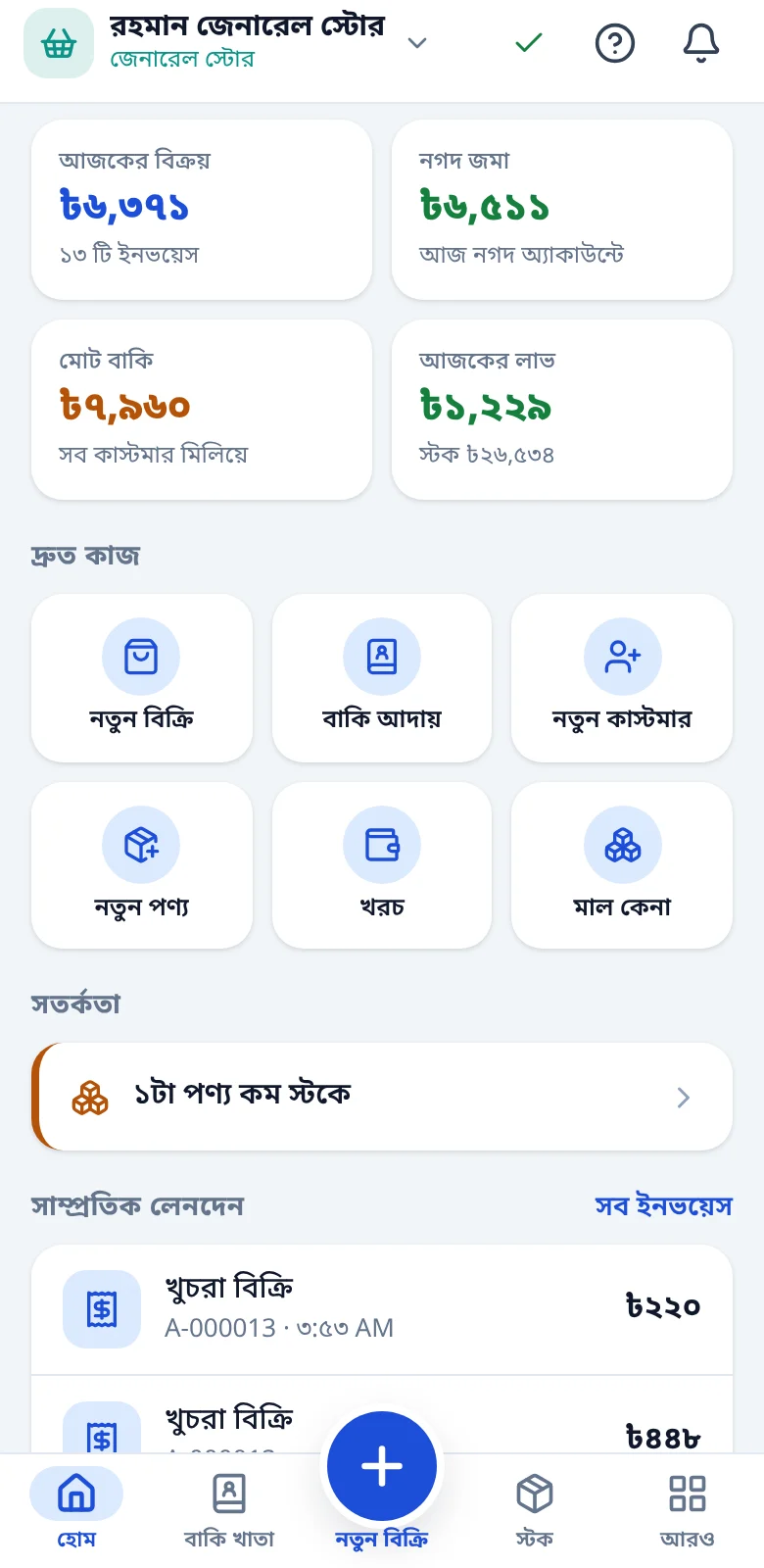
Open the shop, the numbers are waiting
Today at a glance on the home screen: who owes you, what is running low.
- Net sales, cash in and total baki
- Low-stock and near-expiry warnings
- A green tick on the sync icon means everything is saved
Noon
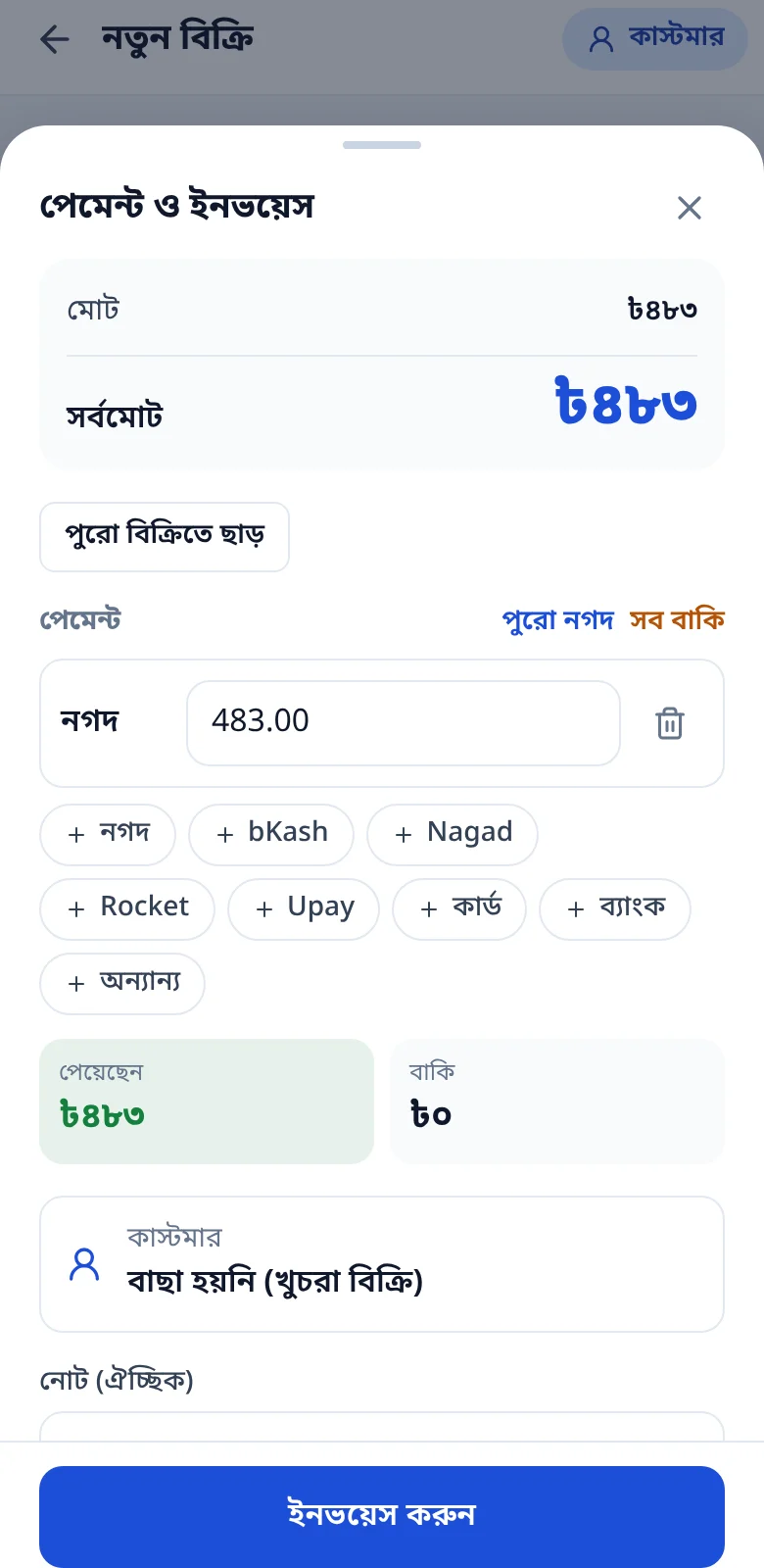
A sale in moments
Pick items or scan a barcode, give a discount, take payment. Whatever is unpaid goes to the customer’s ledger on its own.
- Cash and bKash in the same sale
- Invoice number added for you; print it or send a link by SMS
- A warning if a line sells below cost
Afternoon
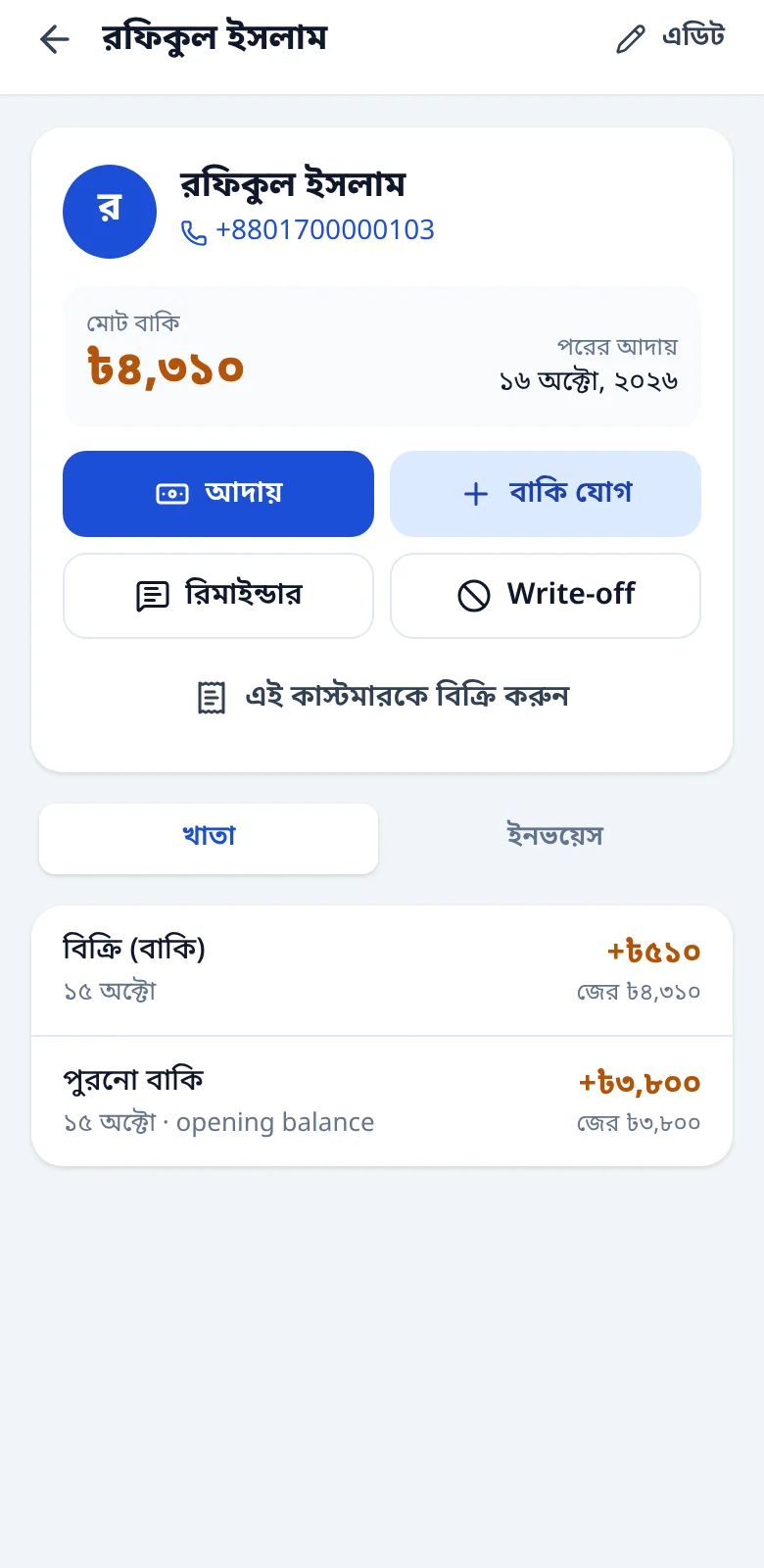
Collect baki without guesswork
Every customer has a ledger: what is due, when, and what is left.
- Collections clear the oldest baki first
- Tap “Send reminder” for an SMS, with the Point cost shown first
- On Business, reminders go out by themselves on the due date
Evening
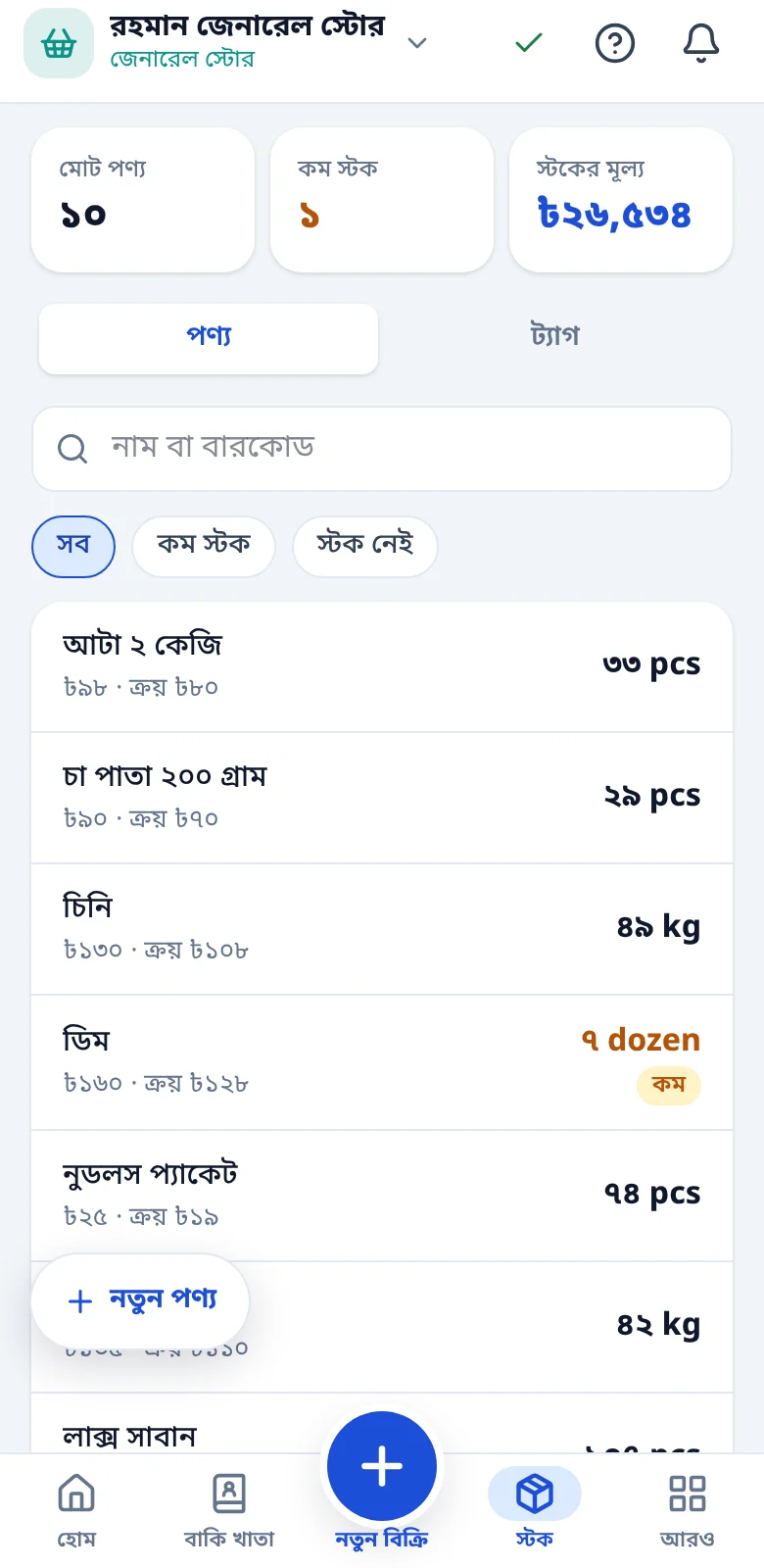
Stock arrives, the books follow
Enter the purchase when goods arrive. Stock goes up and the average cost is recalculated for you.
- Paid in full, in part or on credit, it all reconciles
- What you owe each vendor and when, in a ledger
- Which vendor is cheapest on each product
Night
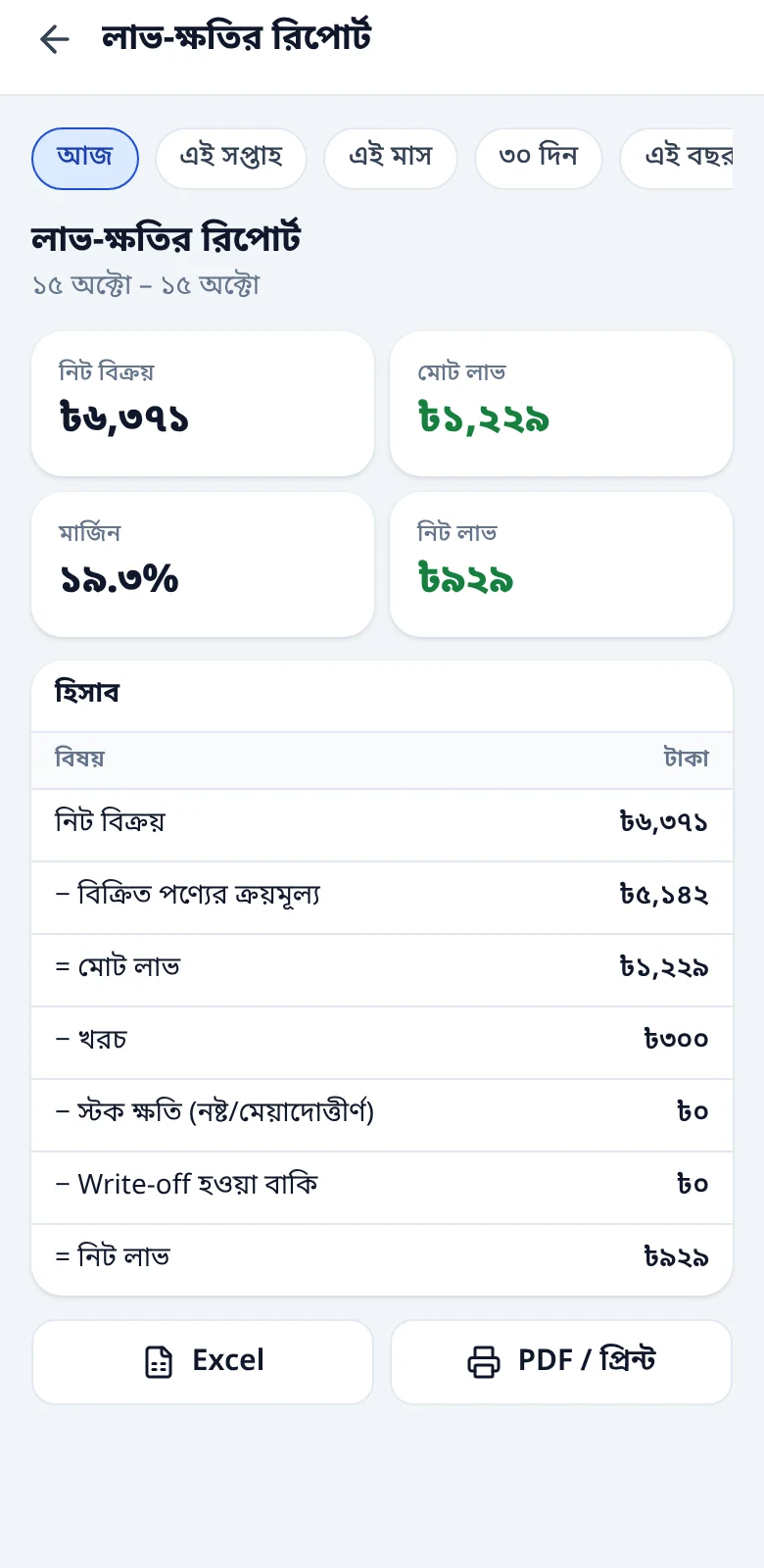
Before the shutter closes: profit and loss
The app tells you how much cash should be in the drawer, you count, and any gap is written down. Then today’s profit.
- Closing difference saved with a note
- Log expenses and net profit comes out by itself
- Daily, weekly and monthly reports
Profit reports, returns, vendors and some automation open on specific plans. Sales and the baki ledger are free on all of them. Full details in the pricing section below.
Everything a shop needs, in one place
The full list, from the first sale to the last profit figure. Where a plan is named, the feature opens from that plan; everything else is on Free too.
Sales & invoices
As fast as you can write at the counter.
- Many items and many payments in one sale: mix cash, bKash, Nagad, Rocket, Upay, card or bank
- Decimal quantities up to three places for kg, g and litres
- Discounts per line or on the whole sale, in ৳ or %
- Barcode scanning with the phone camera or an external scanner
- Invoice numbers carry a device code (e.g. A-000123), so two phones never clash
- Thermal-printer or PDF receipts; send customers an invoice link that needs no login and opens even on 2G
- Returns and exchanges against the original invoice, partial tooFrom Basic
- A wrong entry is never erased, it is voided with a reason and can be restored from the Recycle Bin for 30 days
Credit ledger (baki)
Who owes you what, and by when. Always in front of you.
- A ledger per customer, a due date on every baki
- Collections are applied to the oldest baki first
- Bring your old baki in as an opening balance, or import it from Excel or another app
- SMS reminders that show the Point cost before you send
- Automatic reminders on the morning of the due dateOn Business
- Customers can switch SMS off themselves
Stock & products
What you have, how much, and what it cost. Always reconciled.
- Products with unit, sell price, cost, barcode and reorder level
- Selling past zero stock is never blocked, only flagged
- Running average cost is worked out for you whenever stock arrives
- Every stock change lands in a ledger, with its own reason for damage, expiry or recount
- Import from Excel or CSV (up to 5,000 rows a file); wrong or duplicate rows are shown before anything is saved
- Export everything to Excel or CSV at any time, on every plan
- See at a glance how much money is sitting in stockFrom Basic
Vendors & purchasing
Where stock came from and what you still owe.
- Saving a purchase raises stock; pay in full, in part or on creditFrom Basic
- Vendor ledger, instalment payments and returns to vendorFrom Basic
- See which vendor gives the lowest price on each productFrom Basic
Money accounts & daily book
The app tells you how much cash should be in the drawer.
- Separate money accounts for cash, bKash, Nagad, Rocket, Upay and bank
- End-of-day closing: expected cash against counted cash, with a note on any gap
- Expenses by category; the owner’s own withdrawals are not counted as expenses
- Transfers between accounts and reconciliation with the real bank or bKash balance
Profit & reports
Profit is worked out as you sell. No second notebook.
- Profit is calculated on every sale, even on Free, and old periods appear the moment you upgrade
- Daily, weekly and monthly profit by product, staff member and payment methodFrom Basic
- A warning when a line sells below costFrom Basic
- Promotions that discount chosen products on set dates, with a report of what each one earnedFrom Basic
- Home, reports and DukanIQ share one set of formulas, so the same number never differs between screens
Team & multiple shops
Staff do the work. The books stay yours.
- Owner, Manager and Cashier, each with their own phone number and 4-digit PINOn Business
- Cost price, profit and money accounts are hidden from Cashiers, and you set each person’s discount limitOn Business
- Deactivate a staff member and their login stops at onceOn Business
- Each shop keeps its own data; one shop’s staff cannot see another’s
- Combined sales, profit and baki across all your shopsFrom Pro
Everyday use
No app store. It installs straight from the browser.
- Bangla and English, switchable any time; type numbers in either script
- Installs on the home screen like an app, with no download and no store
- The same shop runs on several phones at once
- Push notifications for low stock, collection days and the end of your trial
When the internet drops, selling doesn’t stop
Your products, customers and the last 13 months of transactions live on the phone. When the net returns, entries sync on their own and no money record ever overwrites another.
Works offline
- Sales, baki and collections
- Stock and customers
- Expenses, purchases and vendor payments
- Printing receipts
- Reports from data on the phone
Needs internet
- First sign-up and the OTP
- Logging in on a new phone
- Paying for a plan, buying SMS Points
- Sending SMS (the server sends after sync)
- Export and support tickets
- The same shop runs on several phones. If two phones record baki for one customer, both entries are kept and nothing is lost.
- Owners can work offline for up to 30 days in a row and staff for 48 hours; after that, go online once.
- On iPhone, add the app to your home screen. Otherwise the phone may clear its data.
Try it
Switch the internet off, then sell
- Press “Make a sale”
Set up for the kind of business you run
Pick your business type when you first sign in and the tabs, buttons and tools change to suit it. 10 types are open today and the rest are on the way.
General Store
Tools made for this type
- Custom sub-category tagsOpen on Basic
Sales, baki, stock and expenses are the same for every type, on every plan.
Start as General StoreDukanIQ: advice from your own shop’s data
No guesses from outside. The app reads your sales, stock, vendors and baki ledger and tells you what to do and when.
On Business and Enterprise plans
Instant from day one: loss sales, reorder and expiry. Trend tips begin once the shop has 90 days of data; earlier data counts and the app shows how many days are left.
Tips arrive as cards. The same topic never repeats, and you can dismiss any card.
Try it free for 15 daysDukanIQ is not part of the free trial; it starts when you take Business.
Instant tips
Sales below cost
After sales syncEvery line sold under its cost today, on one card.
Reorder from your vendor
When stock runs lowWhen stock hits the reorder level: your last vendor and last price, ready.
Before it expires
Every dayBatches that expire within 30 days (Pharmacy, Grocery).
Trend tips, once data builds up
Slow-moving items
NightlyItems selling 25% or more below their earlier monthly average.
Top products
WeeklyYour top 10 by quantity and by profit over 30 days.
Before Eid, Puja, admissions
Before the eventWhat sold more at the same time last year, flagged 21 days ahead.
Cash flow
WeeklyThe next 14 days of expected collections against vendor payments, with a warning for a gap.
Five minutes to get going
No computer, no installer. It all happens in your phone’s browser.
Enter your phone number
A 6-digit OTP arrives by SMS. On Android Chrome the code fills itself in.
Your name and a 6-digit PIN
You log in with this PIN later. Never reuse your bKash, Nagad or bank PIN.
Business type and shop name
Pick yours from the list. Address and shop phone can wait.
Add it to your home screen
No app store needed. On iPhone this matters: without it the phone may clear data and push will not arrive.
Add your first product and customer
Type them in, or bring them from Excel in one go. Coming from another app? Import old baki too.
Make your first sale
Fifteen days of Pro, free. No card, nothing charged.
Signing up means you accept the Terms and Privacy Policy.
Straight prices, nothing hidden
Sales and the baki ledger are free on every plan, with no limits. Open your first shop and get 15 days of Pro, plus 50 SMS Points.
Free
To begin with. Sales and baki never stop.
৳0forever
You get
- Sales and baki ledger, no limits
- Customers, stock, expenses, daily book
- Invoices, receipt printing, invoice SMS
- Import and export with Excel or CSV
- 1 shop
Basic
When you want to see your profit.
৳149/ 30 days
Everything in Free, plus
- Profit and loss reports, loss-sale alerts
- Returns and exchanges
- Vendor management and stock investment
- Promotions
- One key tool for your type of business
- 20 free SMS Points every month
- Most shops pick this
Pro
The full toolkit, more than one shop.
৳299/ 30 days
Everything in Basic, plus
- All tools for your business type
- Daily summary push, combined summary across shops
- Add extra shops
- Barcode by camera and scanner
- 50 free SMS Points every month
- Support first-reply target: 4 working hours
Business
Have a team? Want automation and DukanIQ?
৳499/ 30 days
Everything in Pro, plus
- DukanIQ: advice drawn from your own shop’s data
- Staff: 3 per shop, each with their own PIN and permissions
- Up to 3 shops
- Automatic baki reminders
- 150 free SMS Points every month
- Label printer support
Enterprise
For larger networks and special needs.
By contract
- Unlimited shops and staff
- DukanIQ trends across all shops
- Custom features built for you
- Support with a named contact, 2-working-hour reply target
Extra shops on Pro are ৳199 a month each.
If you do not pay when the trial ends you move to Free. Nothing is charged and no data is deleted.
A plan period is 30 days. Pay with bKash; nothing is taken automatically and you get a reminder before it ends.
SMS Points
Invoice and baki reminder SMS cost Points. The app shows the cost before you send. Points you buy do not expire.
The Free plan has no monthly Points (0); buy what you need.
- ৳50100 Point
- ৳200450 Point12.5% extra
- ৳5001,200 Point20% extra
These are the listed prices. How VAT or taxes are shown will be stated clearly in the app at payment. Questions? Ask +880 1841-044740 by phone or WhatsApp.
Your books are yours, and safe
Nobody asks for your PIN or OTP
We will never ask for your PIN or OTP. If someone does, do not share it.
Your data stays yours
Only you and the staff you authorise see the shop’s data. You decide what each staff member can do.
Encrypted backups
Backups are taken regularly, and your own copy lives on the phone.
Export any time
Download everything as Excel or CSV. Nothing is held hostage.
Mistakes are voided, not erased
Each void carries a reason and can be restored for 30 days, so the history stays intact.
We never see your payment details
Payment happens on bKash’s own page. We never see your bKash PIN.
Read the details: Privacy Policy, Data Security Policy, Payment disclosure.
What everyone asks
Not here? Ask us directly on WhatsApp.
How long is the free trial?
When you open your first shop you get a one-time 15-day trial: every Pro feature plus 50 free SMS Points (excluding DukanIQ, Staff and extra shops). If you do not pay afterwards you move to the Free plan: sales, baki and stock keep working, nothing is charged, no data is deleted.
How do I buy SMS Points?
Go to "More → SMS Points → Buy Points" (owner only). ৳50 gets 100, ৳200 gets 450 and ৳500 gets 1,200 Points. You can pay with bKash; Points are added as soon as the payment is confirmed.
How do I add a new shop?
"More → Create new shop". It is off on Free and Basic; on Pro each extra shop is ৳199/month; Business includes up to 3 shops.
How do I renew my plan?
Reminders start 3 days before expiry. Go to "More → Settings → Business settings → Billing & Plan → Renew" and pay with bKash. After expiry you get a 3-day grace with everything still on; if you still do not pay you move to Free and no data is deleted.
How do baki SMS reminders work?
Open the customer in the baki ledger and tap "Send reminder"; it shows how many Points it will cost before sending. On Business, turning on "Auto reminder" in settings sends it automatically on the due date morning. Both use SMS Points.
Does it work without internet?
Yes. Sales, baki, stock and expenses all work offline, are saved on your phone and sync by themselves when you are back online. Before changing phones or deleting the app, check for the green tick on the sync icon at the top.
When does DukanIQ start?
On Business and Enterprise. Instant tips (loss-making sales, vendor reorder) start the day you get Business. Trend tips start once the shop has 90 days of data (with at least 45 days of sales); earlier data counts too, and the app shows how many days are left.
How do I get a refund?
Go to "Help & Support → Report a problem → Payment or refund", or email support@dokaandigit.com with your phone number and Transaction ID. Double charges, a charge without the plan activating, or a charge after cancelling are refunded in full. bKash refunds return to the same number within 7–10 working days.
What if I forget my PIN?
Owner: tap "Forgot PIN" on the login screen and set a new PIN with an OTP. Staff: ask the shop owner to reset your PIN.
What if I lose my phone or SIM?
From your new number fill in the "Account Recovery" form at dokaandigit.com/support or message us on WhatsApp. After verification and a 48-hour waiting period your account moves to the new number; no data is deleted.
Is my data safe?
Only you and the staff you authorise can see your shop data. Encrypted backups are taken regularly. You can export all your data at any time and request account deletion. We will never ask for your PIN or OTP.
What if a customer wants to stop SMS?
The customer opens the receipt link and taps "Stop SMS from this shop" at the bottom; no more SMS will be sent.
Stuck? A real person will answer
WhatsApp, phone or email, whichever is easier. The same number takes calls and WhatsApp.
Every day, 9 am to 9 pm
Tonight, write the books on your phone
15 days of Pro, free. No card needed, nothing charged.